
વર્ણન
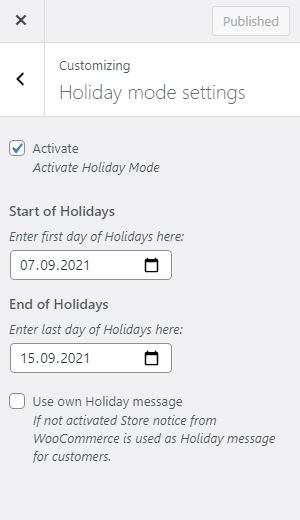
Set your WooCommerce® shop to holiday/vacation mode. Use date range to schedule closed time. You can use WooCommerce® store notice or separate message to display information to your customers.
- Disable Orders (remove add to cart button and display message)
- Disable Cart (items in active carts will be removed when activated holiday mode)
- Disable Checkout
- Display Custom Notification to your clients or use WooCommerce® store notice
- Set up a Start and End date for your holidays
- Automatically disable mode when vacation ends
WooCommerce® is a registered trademark of Automattic Inc.
Privacy Disclosure
This plugin does not store any personal data.
સ્ક્રીનશોટ


સ્થાપન
This section describes how to install the plugin and get it working.
- Upload
folderto the/wp-content/plugins/directory - Activate the plugin through the ‘Plugins’ menu in WordPress
- Open
Appearance -> Customize -> Holiday mode settingsto setup holiday mode
સમીક્ષાઓ

માર્ચ 14, 2023
I've tested with version 6.1.1. The banner does not appear, it only removes the add to basket and google and/or apple pay button. It would be useful if the settings were more fruitful and it would allow you to just show the message rather than stop orders all together.

માર્ચ 9, 2023
Great! Simple and useful plugin.
Everything works flawlessly. This plugin enables everything that I could not achieve with code snippets. Amazingly good.

ઓગસ્ટ 17, 2022
Easy to configure, it does what it should and if after the vacation everything works again (the cache) I am very happy.
The alternative message is not displayed although configured. But for the functionality and because the plugin is free 4 stars anyway.

ડિસેમ્બર 16, 2021
I was tasked with shutting down a client's WooCommerce store for the Xmas holidays so being lazy and in a hurry I looked to see if there was a well worn plugin for that simple task. Some were far too elaborate, others expensive for what little I needed, but this one with zero reviews yet turned out to be just right. Closed for the Holidays, that's it. I'm going to make myself a rum and eggnog now. I'd like to buy Heinrich Franz a drink. Maybe I'd prefer the controls somewhere under Woocomerce than under Appearance - Customize - but hey, whatever.
ફાળો આપનાર & ડેવલપર્સ

“Holiday Mode for WooCommerce” નું 2 ભાષામાં અનુવાદ કરવામાં આવ્યું છે. Thank you to the translators for their contributions.
“Holiday Mode for WooCommerce” ને તમારી ભાષામાં અનુવાદ કરો.
વિકાસમાં રસ ધરાવો છો?
કોડ બ્રાઉઝ કરો, એસવીએન રીપોઝીટરીમાંથી ચેકઆઉટ કરો, અથવા આરએસએસ દ્વારા ડેવલપમેન્ટ લોગમાં સબ્સ્ક્રાઇબ કરો.
ચેન્જલૉગ
1.7.1
- Compatibility for WordPress 5.9
1.7
- Add additional message on product page to increase theme compatibility (if woocommerce_before_main_content is not used by active theme)
- Settings are only visible if WooCommerce is activated within WordPress
- HTML is now possible for customer message
- Only provide vacation feature if WooCommerce is available
- Lowest PHP version is now 7.3, because lower versions reached EOL
1.6
- Fixed warning: Timezone is used correctly now
1.5
- Add further translation
1.4
- Fixed default translation language
1.3
- Add german language
1.2
- Fixed defined version, to allow updates
1.1
- Fixed settings: names are now more unique
1.0
- Initial version