
વર્ણન
Have you ever been in situation where you publish post. But displayed in wrong location due to forgot setting the right tags / categories.
Or, broken blog layout because of forgot to setting featured images.
Don’t worry, this plugin will help you remember that. You could also set custom warning messages to your like.
સ્ક્રીનશોટ
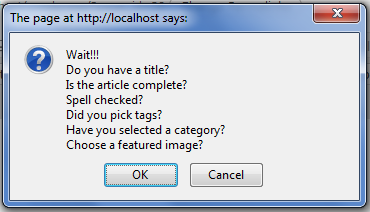
This is what you’ll see whenever you push the publish button 
This is where admin setting located 
Input your custom messages here
સ્થાપન
- Upload
crpostwarningdirectory to the/wp-content/plugins/directory - Activate the plugin through the ‘Plugins’ menu in WordPress
- Go to Settings »
[CR]Post Warningand set your warning messages
એફએક્યુ (FAQ)
- What is the minimum PHP requirement?
-
For the plugin itself, PHP4 and JAVASCRIPT activated. Right, you need javascript to be able to use this plugin.
સમીક્ષાઓ
આ પ્લગઇન માટે કોઈ સમીક્ષાઓ નથી.
ફાળો આપનાર & ડેવલપર્સ

“[CR]PostWarning” ને તમારી ભાષામાં અનુવાદ કરો.
વિકાસમાં રસ ધરાવો છો?
કોડ બ્રાઉઝ કરો, જોવોઅસ્વીએન રેપોઝિટરીમાંથી,અથવા સબ્સ્ક્રાઇબ કરોડેવલપમેન્ટ દ્વારાઆરઅસઅસ.