

વર્ણન
Please note: This plugin requires EasyRotator for WordPress.
This plugin enhances the functionality of EasyRotator for WordPress by making social sharing buttons automatically appear when hovering over any photo in a rotator.
Requirements:
- You must be using EasyRotator for WordPress
Important Links:
EasyRotator is a registered trademark of Magnetic Marketing Corp dba DWUser.com.
સ્ક્રીનશોટ
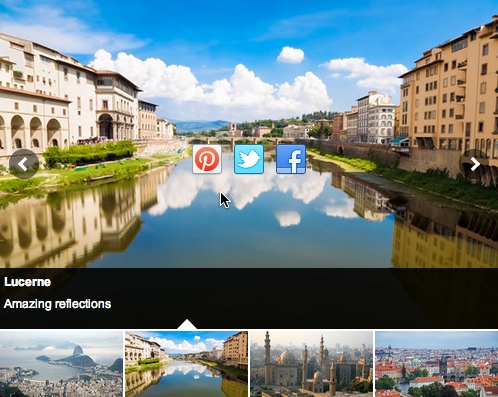
સ્થાપન
- Upload the
easyrotator-social-addonfolder and all of its contents into your plugins directory (/wp-content/plugins/by default) - Open the WordPress admin panel and go to the ‘Plugins’ page
- Activate the new ‘EasyRotator Social Add-On’ item in the list of plugins
To enable social sharing for a single rotator:
Locate the EasyRotator shortcode in the post or page editor; for example:
[easyrotator]erc_00_xxxxxxx[/easyrotator]
Add social="true" as a shortcode parameter:
[easyrotator social="true"]erc_00_xxxxxxx[/easyrotator]
To enable social sharing for all rotators:
Use the plugin editor to edit this line in the easyrotator-social-addon.php file:
const APPLY_TO_ALL_ROTATORS = false;
Change the value to true:
const APPLY_TO_ALL_ROTATORS = true;
એફએક્યુ (FAQ)
- I’m having trouble getting started with EasyRotator for WordPress or the Social Add-On; what can I do?
-
Please see the detailed installation and usage instructions on our website. If you can’t find the answer there, we offer responsive complimentary support.
સમીક્ષાઓ
આ પ્લગઇન માટે કોઈ સમીક્ષાઓ નથી.
ફાળો આપનાર & ડેવલપર્સ

“EasyRotator Social Add-On” ને તમારી ભાષામાં અનુવાદ કરો.
વિકાસમાં રસ ધરાવો છો?
કોડ બ્રાઉઝ કરો, જોવોઅસ્વીએન રેપોઝિટરીમાંથી,અથવા સબ્સ્ક્રાઇબ કરોડેવલપમેન્ટ દ્વારાઆરઅસઅસ.
ચેન્જલૉગ
1.0.0
- First release