

વર્ણન
seljeDrive Document Library for Google Drive lets you publish a Google Drive folder on your WordPress site as a simple file explorer.
Find this free plugin useful? Please support my work on this plugin by sending me a one-time donation (50% of the proceeds go to Ukraine).
Key features:
- Browse a Google Drive folder (via a shared folder link)
- Search inside the library
- Open files in a new tab or download files
- Create multiple libraries and embed each with a shortcode
- Control access per library:
- Public
- Logged-in users
- Specific roles
Find this free plugin useful? Please support my work on this plugin by making a donation.
Privacy
This plugin relies on third party services to function.
Google Drive is a trademark of Google LLC. This plugin is not affiliated with or endorsed by Google.
WordPress is a trademark of the WordPress Foundation. This plugin is not affiliated with or sponsored by, the WordPress Foundation.
Third Party Services
Google (Google OAuth + Google Drive API)
What it is used for:
- Connecting your WordPress site to Google (OAuth)
- Listing/searching files and folders from Google Drive
- Opening/downloading files via Google-hosted URLs
When data is sent:
- When an administrator clicks Connect Google and completes authorization
- When anyone views a page that contains the
[sg_doc_library]shortcode (your WordPress site fetches file/folder metadata from Google to render the library) - When a visitor uses Search / Open / Download inside the library
- When the plugin refreshes an expired access token (if you have connected with offline access)
What data is sent:
- During OAuth authorization (admin action): client ID, redirect URI, state, requested scope, and an authorization code
- During API calls to Google Drive: an OAuth access token (in an Authorization header), Google Drive file/folder IDs, and search terms entered by the user (if search is used)
- During Open/Download (visitor action): your WordPress site returns a redirect URL and the visitor’s browser is sent to a Google-hosted URL containing the file ID (for example
docs.google.comexport links ordrive.google.comdownload links)
Data flow / conditions:
- Google Drive API requests are made server-to-server (from your WordPress site to Google) using the OAuth token stored in your WordPress database.
- The visitor’s browser is only sent directly to Google when the visitor clicks Open or Download.
Endpoints contacted:
- https://accounts.google.com/o/oauth2/v2/auth
- https://oauth2.googleapis.com/token
- https://www.googleapis.com/drive/v3
Visitor browser destinations (when using Open/Download):
- https://docs.google.com/
- https://drive.google.com/
OAuth scope:
- https://www.googleapis.com/auth/drive.readonly
Google Privacy Policy:
- https://policies.google.com/privacy
Google Terms of Service:
- https://policies.google.com/terms
Google APIs Terms of Service:
- https://developers.google.com/terms
Stripe (Donate link)
What it is used for:
- Optional donations via a Stripe-hosted checkout page
When data is sent:
- Only when an administrator clicks the Donate button in the plugin admin page
What data is sent:
- The plugin itself does not send payment details. Clicking Donate opens a Stripe-hosted page in your browser. Stripe then receives the data needed to load and process the checkout (such as your IP address, browser/user agent, and any information you enter on the checkout page).
Stripe Privacy Policy:
- https://stripe.com/privacy
Stripe Terms / Legal:
- https://stripe.com/legal
Configuration
Google OAuth
- In Google Cloud Console:
- Enable Google Drive API
- Create an OAuth 2.0 Client ID (type: Web application)
- In WordPress admin:
- Go to Settings -> seljeDrive Document Library for Google Drive
- Add your Client ID and Client Secret
- Copy the Redirect URI shown on the plugin admin page
- Back in Google Cloud Console:
- Add that Redirect URI as an authorized redirect URI
- Back in WordPress:
- Click Connect Google
Plugin settings
Google OAuth
Client ID
The OAuth 2.0 Client ID from your Google Cloud project. Find it under APIs & Services > Credentials > OAuth 2.0 Client IDs in the Google Cloud Console.
Client Secret
The OAuth 2.0 Client Secret from your Google Cloud project. It is stored encrypted (AES-256-CBC) in the WordPress database. Leave the field blank to keep the existing stored secret when re-saving settings.
Redirect URI
A read-only field showing the URI you must register as an Authorized Redirect URI in your Google Cloud Console OAuth client. Copy it with the Copy button and paste it into Google Cloud Console before clicking Connect Google.
Connect Google / Disconnect
After saving your Client ID and Client Secret, click Connect Google to start the OAuth authorization flow. Once the authorization is complete, the status shows Connected. Click Disconnect at any time to remove the stored OAuth token.
Libraries
Name
A label for your own reference to identify this library in the admin. It is not visible to visitors on the frontend.
Public Folder Share URL
The sharing URL of a Google Drive folder. The folder must be shared with “Anyone with the link can view” in Google Drive before it will work with this plugin.
Access
Controls who can browse this library:
- Public: Anyone, including non-logged-in visitors.
- Logged-in users: Only authenticated WordPress users.
- Specific roles: Only users with the selected WordPress roles.
Allowed roles
Only shown when Access is set to Specific roles. Check all WordPress user roles that should be allowed to view the library. Visitors not matching a selected role will see an access denied message.
Hide Open button
When enabled, the Open button is hidden in the file list. Visitors cannot open files in a new browser tab directly from the library.
Hide Download button
When enabled, the Download button is hidden in the file list. Visitors cannot download files directly from the library.
Remove header from frontend
When enabled, the breadcrumb navigation and the search bar at the top of the library are removed from the frontend display. Useful when you want a minimal, non-navigable file list.
Icon is preview of file content
When enabled, Google Drive preview thumbnails are loaded as file icons instead of generic file-type icons. This provides a visual preview of each file’s contents, but may slightly increase page load time for large folders.
Frontend language
Sets the display language for this library’s UI elements (buttons, status messages, labels). Defaults to the WordPress site language if left on Default. Change this per library if you need a different language than the site default.
Root folder label
Custom text displayed as the label for the top-level breadcrumb in the file explorer. Leave empty to use the plugin’s built-in default root label (typically “Root” or its translation).
Allowed file extensions
A comma-separated list of file extensions to show in the library, e.g. pdf,docx,xlsx. Leave empty to display all file types from the Google Drive folder. Extensions are matched case-insensitively.
સ્ક્રીનશોટ
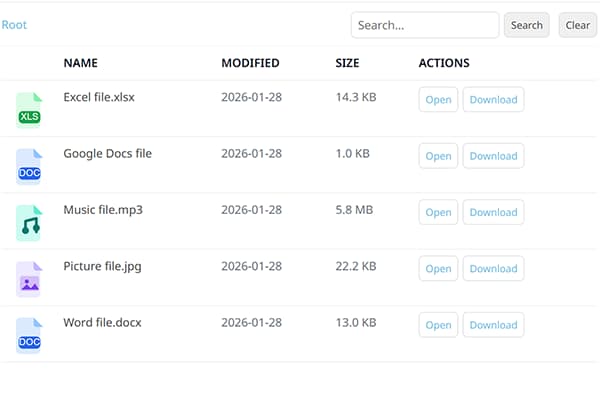
Frontend file explorer. 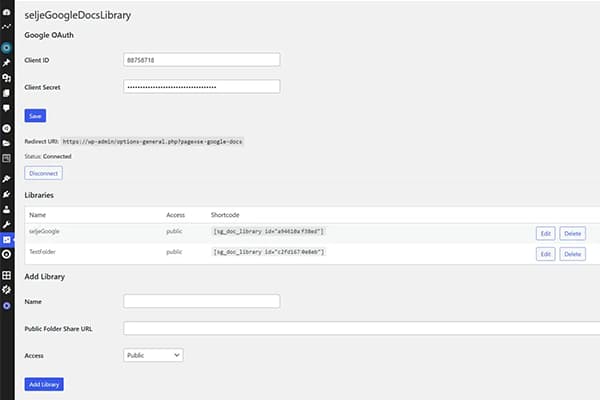
Plugin admin page.
સ્થાપન
- In WordPress admin, go to Plugins -> Add New.
- Search for seljeDrive Document Library for Google Drive.
- Click Install Now and then Activate.
એફએક્યુ (FAQ)
-
How do I embed a library on a page?
-
Use the shortcode shown in the Libraries list, for example:
[sg_doc_library id="YOUR_LIBRARY_ID"] -
What PHP version is required?
-
Minimum required PHP is 7.4.
-
Does it support Norwegian language?
-
Yes. The plugin is translation-ready and includes a Norwegian Bokmål (
nb_NO) translation source file.WordPress typically uses compiled
.mofiles at runtime.
સમીક્ષાઓ
આ પ્લગઇન માટે કોઈ સમીક્ષાઓ નથી.
ફાળો આપનાર & ડેવલપર્સ

“seljeDrive Document Library for Google Drive” નું 2 ભાષામાં અનુવાદ કરવામાં આવ્યું છે. તેમના યોગદાન માટે અનુવાદકો આપનો આભાર.
“seljeDrive Document Library for Google Drive” ને તમારી ભાષામાં અનુવાદ કરો.
વિકાસમાં રસ ધરાવો છો?
કોડ બ્રાઉઝ કરો, જોવોઅસ્વીએન રેપોઝિટરીમાંથી,અથવા સબ્સ્ક્રાઇબ કરોડેવલપમેન્ટ દ્વારાઆરઅસઅસ.
ચેન્જલૉગ
1.3.0
- Added styled hover tooltips (info icons) on every settings field in the admin page
- Redirect URI is now copyable via a Copy button
- Rebuilt the sidebar developer section: renamed to “-FROM THE DEVELOPER-“, added structured headings for Other plugins, Other software, Contact, and Visit our vacation homes
- Documentation link now opens the full readme in an inline overlay instead of opening an external website
- Added links to seljeDrive Document Library for Google Drive, seljeVisitorsFlags, Skriveline, sTimeFlow, Discord, and Sansel Rental
- Updated readme Plugin settings section with descriptions of every setting
- Tested up to WordPress 7.0
- Updated Norwegian Bokmål translation
1.2.1
- Fixed missing template file and admin CSS that caused a broken admin page after the 1.2.0 update
1.2.0
- Moved settings page from Tools to Settings menu
- Admin notices now display feedback after save, connect, disconnect, and delete actions
- Client Secret is now encrypted at rest (AES-256-CBC)
- Folder listings now paginate beyond 200 files (up to 2 000)
- Added rate limiting on REST endpoints (60 requests/minute per IP)
- Stale folder cache cleared automatically when a library is deleted
- Admin page HTML extracted to a separate template file for maintainability
- Added placeholder text to the Allowed file extensions field
1.1.0
- Added per-library option to choose frontend language (installed WordPress languages)
1.0.3
- Added option to show Google Drive file preview thumbnails as icons
- Improved copied confirmation when clicking the shortcode
1.0.2
- Added option to remove header from frontend
- Added option to customize the root folder label
1.0.1
- Renamed main plugin file
- Version bump
0.70
- Backend moved to Tools menu
- Added hover tooltips in the backend
- Improved translation loading (incl. locale switch support)
- Updated donate button styling
0.64
- Removed Freemius dependency
- All features available in the single WordPress.org version (multi-library, access control, full-text search)
- Updated external service disclosures (Google APIs, Stripe)
0.63
- WordPress.org compliance fixes (text domain alignment, translation loading, security/escaping)
0.62
- Minor language update
0.61
- Added a non-intrusive Donate button in the plugin admin page
0.60
- Fixed Google Drive search error for full-text queries
- Security hardening for REST references
0.5
- Multi-library support (multiple shortcodes on one page)
- Added icons in the file list
0.1.2
- Added translations support (including Norwegian Bokmål source translation)
- Improved admin UI translations