
વર્ણન
The Generic WP Shortcode Editor plugin gives to TinyMCE the ability to create or edit shortcodes in a visual way, instead of editing the code directly.
સ્ક્રીનશોટ
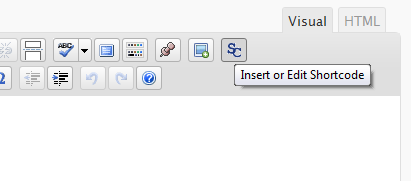

સ્થાપન
- Upload the entire folder
shortcode-editorto the/wp-content/plugins/directory - Activate the plugin through the ‘Plugins’ menu in WordPress
- Search for the [SC] button in TinyMCE toolbar
એફએક્યુ (FAQ)
- There are other plugins that adds buttons to manipulate shortcodes. Is this a problem?
-
Some plugins that work with shortcodes adds their own buttons to TinyMCE and we try to respect it, using a lower priority when adding the TinyMCE hooks.
- When editing, we can see the`sc_id` property in all shortcodes. What is this?
-
This property is used internally by the plugin and it is removed from all shortcodes when you submit the form.
સમીક્ષાઓ
આ પ્લગઇન માટે કોઈ સમીક્ષાઓ નથી.
ફાળો આપનાર & ડેવલપર્સ

“TinyMCE Generic WP Shortcode Editor” ને તમારી ભાષામાં અનુવાદ કરો.
વિકાસમાં રસ ધરાવો છો?
કોડ બ્રાઉઝ કરો, જોવોઅસ્વીએન રેપોઝિટરીમાંથી,અથવા સબ્સ્ક્રાઇબ કરોડેવલપમેન્ટ દ્વારાઆરઅસઅસ.
ચેન્જલૉગ
1.0
First release.